Devices, apps and websites
Upload the software of a device (a Linux-based firmware image), connect an app’s code or its parts list (SBOM), or check a website. One view of what your product contains and where its security holes are.
CYBERSECURITY FOR DEVICES, APPS AND WEBSITES · BUILT IN THE EU
KROMSE checks the software in your devices, apps and websites for security holes – weak spots attackers can use to break in or steal data. It explains each one in plain words and, where it can, prepares the fix for you, with proof of what was checked. Nothing changes until you approve it.
Walk through KROMSE with a product expert.
No card required.
Devices · Apps · Websites → Security holes explained → Fixes you approve
Supported by


Recorded in the KROMSE workspace on KROMSE’s own demo projects; the fix part uses a demo repository. Silent, 36 seconds. Not results from your product.
Create a free workspace, then add what you make: the software of a device (a Linux-based firmware image), the code of an app, or the address of a website. Your team decides which findings need a response after reviewing their impact.
The KROMSE GitHub App is read-only, and you choose which repository it may see. No repository to hand? Upload an SBOM (a list of the parts your software is built from) in CycloneDX or SPDX format instead: parts with supported identifiers are checked against OSV, a public database of known security holes. Parts without those identifiers are not checked. An SBOM carries no source code, so the secret, code and infrastructure checks of a repository scan do not run on it.
KROMSE checks the parts found at the scanned version, or listed in your SBOM, against supported sources of known security holes, and records what it could not check. Fixes are opt-in and switched on per workspace: KROMSE prepares them for updates of open-source parts in GitHub repositories, as a draft pull request (a proposed change) that your team reviews and merges.
How it works
Connect your app’s code, upload an SBOM or the Linux firmware of your device. KROMSE lists the parts it recognises and checks them for known vulnerabilities (CVEs), exposed secrets and weaknesses in your own code.
Every security hole is explained in plain words, with its severity and a risk score for the product, so you know where to start.
Where it can, Rook prepares the exact change and shows the checks it ran. Today that means updates of open-source dependencies in GitHub repositories, switched on per workspace.
No security team needed: one developer reads the change and its checks, approves it, and Rook opens a draft pull request. Merging stays your decision.
This is the real KROMSE product, not an illustration: a scan of a code repository, the security holes it found, and Rook, KROMSE’s fixing assistant, preparing fixes that wait for a person to approve them.
A scan, start to finish
KROMSE identifies components and checks them against vulnerability advisories. Follow the path from the source file to the affected version.
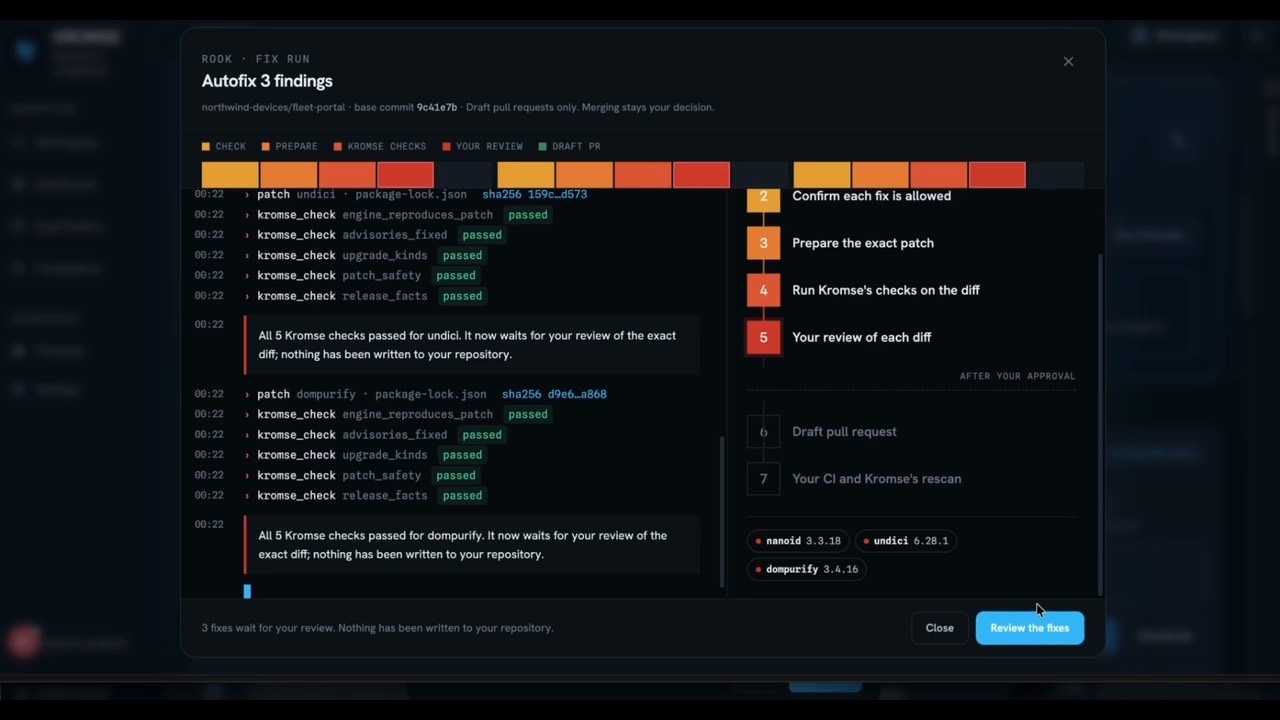
Rook fix review in KROMSE’s demo project. This is a frame from the product recording, not results from your product.
What you get

 KROMSESample productIllustrative example
A clear view of what needs attention
3findings to review
Attackers are exploiting this vulnerability elsewhere — confirmed exploitation somewhere in the world, not evidence of anything in your product. Your build includes the affected version.
Upload the software of a device (a Linux-based firmware image), connect an app’s code or its parts list (SBOM), or check a website. One view of what your product contains and where its security holes are.
Every security hole comes with a plain-language explanation. Within your usage allowance, AI reviews the most important ones: are they likely to affect you, what to update, and what it cannot know. Your team makes the final call.
Your first scan is free and needs no sales call. Basic is €59 monthly or €49 per month billed €588 annually, excluding VAT. The application, database and scanners run in Germany; scan evidence and firmware are stored with Cloudflare, and AI requests go to providers outside the EU.
Selling in the EU? The same scan prepares your Cyber Resilience Act evidence for human review.
02 / FOLLOW THE EVIDENCE
Record your team’s determination and supporting evidence. Use them in an internal CRA report draft, with missing information visible and human review still required.
Open your workspaceWhat a scan gives you
KROMSE explains each one in five parts, so anyone on your team can judge what it means for your product.
“Attackers are using this security hole elsewhere — that means confirmed attacks somewhere in the world, not evidence of anything in your product.”
Known exploitation elsewhere does not establish exploitation in your product. KROMSE keeps that distinction explicit.
Matching a component to an advisory does not by itself prove that your product is exploitable. KROMSE shows reachability only when a supported analysis engine produced evidence for that scan. Otherwise it remains unverified. Your team reviews the product impact.
After your team confirms that a finding affects a product you place on the EU market, KROMSE can open a response case and record your decision. You choose when to prepare an internal Article 14 draft. Missing facts stay marked for human review, and tracked dates are an operational aid, not a legal determination.
Tell us about your product and what you’d like to see. We’ll contact you to arrange a demo with a product expert.
Pricing
Get your first product into view with a free workspace. Add capacity and support as your team grows.
€0/ month
Evaluate KROMSE on one real product, with bounded usage.
No card required.
€49/ month
Excluding VAT
€588 billed annually
Save €120/year
7-day trial for eligible new subscriptions. Card required. Cancel before the trial ends and pay nothing; otherwise the full annual amount is charged when it ends.
For a small team taking one or two products through the CRA.
Choose an available billing option in Plan & usage.
€249/ month
Excluding VAT
€2,988 billed annually
Save €600/year
7-day trial for eligible new subscriptions. Card required. Cancel before the trial ends and pay nothing; otherwise the full annual amount is charged when it ends.
For teams reviewing security evidence across a portfolio of products.
Choose an available billing option in Plan & usage.
Contact sales
Scope and pricing agreed for your product portfolio.
Availability and service scope confirmed in a written proposal.
Published prices per workspace in EUR, excluding VAT. For professional use, including freelancers. Available purchase options appear in Plan & usage. Creating a workspace does not start a paid subscription.
Cancel renewal at any time and keep access until the paid term ends. Current-term fees are non-refundable except where required by law.
Pro includes 5× Basic’s AI usage. Enterprise AI usage is customizable and agreed for your team. Included usage renews monthly, including on annual plans.
Cyber Resilience Act
Manufacturers of products with digital elements must report actively exploited vulnerabilities and severe incidents from 11 September 2026 (Article 14). The rest of the Regulation applies from 11 December 2027.
Reporting an actively exploited vulnerability, Article 14(2)
Source: Regulation (EU) 2024/2847, Articles 14 and 71(2) and Annex I. KROMSE does not certify compliance and sends nothing to authorities.
Scope and limits
A compliance record is only worth having if it survives someone disagreeing with it. That means being precise about where the software stops and a person starts.
It does not certify you. No software can: CRA conformity is a manufacturer's declaration, and a scan is evidence toward it, not a substitute for it.
It does not file your Article 14 report. KROMSE drafts the document and marks what it cannot know; a human reviews, completes and submits it.
It does not claim that a security hole in a part you use can be attacked in your product. It tells you the part is present and says plainly what that does and does not establish.
It does not invent the parts it has not been given. Missing information stays a marked blank, never a plausible-sounding guess.
Scans provide product-security evidence. Separate NIS2 and EU AI Act readiness workspaces organize information for human review; they do not turn a scan result into a compliance determination.
Questions
No. You can connect a GitHub repository or upload a CycloneDX or SPDX SBOM.
No. GitHub, GitLab, Bitbucket, Azure DevOps or any HTTPS git server works with a read-only access token. And any build pipeline can push the SBOM of every release with an API token, without giving KROMSE access to your code at all.
KROMSE reads only the repositories you select and resolves the dependency tree at a specific commit. The scanner is read-only. Rook (Autofix), only when you turn it on, opens draft pull requests you review and merge.
No. It is limited by capacity — one product and 2 scans per rolling 30 days — not by a countdown. The product shows you your own live limits and usage.
Workspace owners and administrators can open Plan & usage to see available subscriptions and extra AI allowance purchases. Stripe shows the final price and applicable tax before you confirm payment. For Enterprise, contact sales.
It produces evidence and drafts records. Conformity remains the manufacturer's declaration, made by a person who reviews what the product assembled.
KROMSE is available in English, Spanish (Spain), French, German and Italian. Choose your language in Settings → Language. Original evidence, earlier messages and documents retain their original language.
Where it can. Rook, KROMSE’s fixing assistant, prepares the fix for a security hole and shows the checks it ran. Today it covers updates of open-source dependencies in GitHub repositories and is switched on per workspace. Nothing is written to your code until a person approves the exact change; Rook then opens a draft pull request, and merging stays your decision.
No. KROMSE explains each security hole in plain words and prepares fixes where it can, so a developer or product owner can act on it. A person on your team still reviews and approves every fix and every report.
Yes. Upload a Linux-based firmware image of up to 512 MB: KROMSE unpacks it, lists the packages it recognises, checks them for known vulnerabilities and records what it could not analyse. Bare-metal, RTOS and encrypted images are reported as not analysable, never as clean. Yocto and Buildroot build manifests can be uploaded too; their parts are listed but not matched against advisories.
Yes. An SBOM (software bill of materials) is the list of parts your software is built from. KROMSE produces one in CycloneDX and in SPDX for every scan of a repository, container image or Linux-based firmware image, and you can upload your own.
No. Besides known vulnerabilities (CVEs) in the parts you use, KROMSE checks your own source code for weaknesses, such as injection flaws, with Opengrep rules for 11 languages, and looks for exposed secrets and misconfigurations. These findings have no public advisory; your team reviews them.
Scan for free
Start with one product and get its security holes explained in plain words, at an exact version you can trace. Free, and no checkout in the way.
Create an account, then add your first product.
Build a tool KROMSE should connect with? Become a technology partner.